- Published on
Building a RAG-Based LLM Q&A App - LangChain, OpenAI, and Pinecone
- Authors
- Name
- Mohit Appari
- @moh1tt


RAG, LLMs, LangChain, OpenAI, Pinecone, Vector DBs — sounds like a lot of jargon, right? By the end of this post you'll understand how each piece fits together, and have a working RAG-based LLM app built on your own data.
Thanks to Alex Litvinov for the informative walkthrough on Building ZoomcampQABot and to Krish Naik for the LangChain deep dive that this project builds on.
What is Retrieval-Augmented Generation (RAG)?
Large language models have undergone a remarkable boom in recent years, reshaping natural language processing and AI more broadly. Models like OpenAI's GPT series and Google's BERT are characterized by their scale — often billions or trillions of parameters — and their ability to understand and generate human-like text at unprecedented complexity.
But what if you want the model to reason over your own data — lecture notes, internal docs, a codebase — rather than just what it was trained on? That's where RAG comes in.
RAG is an architectural approach that improves the usefulness of LLM applications by retrieving documents relevant to a question and feeding them to the model as context, instead of relying solely on what's baked into its weights. It's particularly effective for support chatbots and Q&A systems that need up-to-date or domain-specific knowledge.
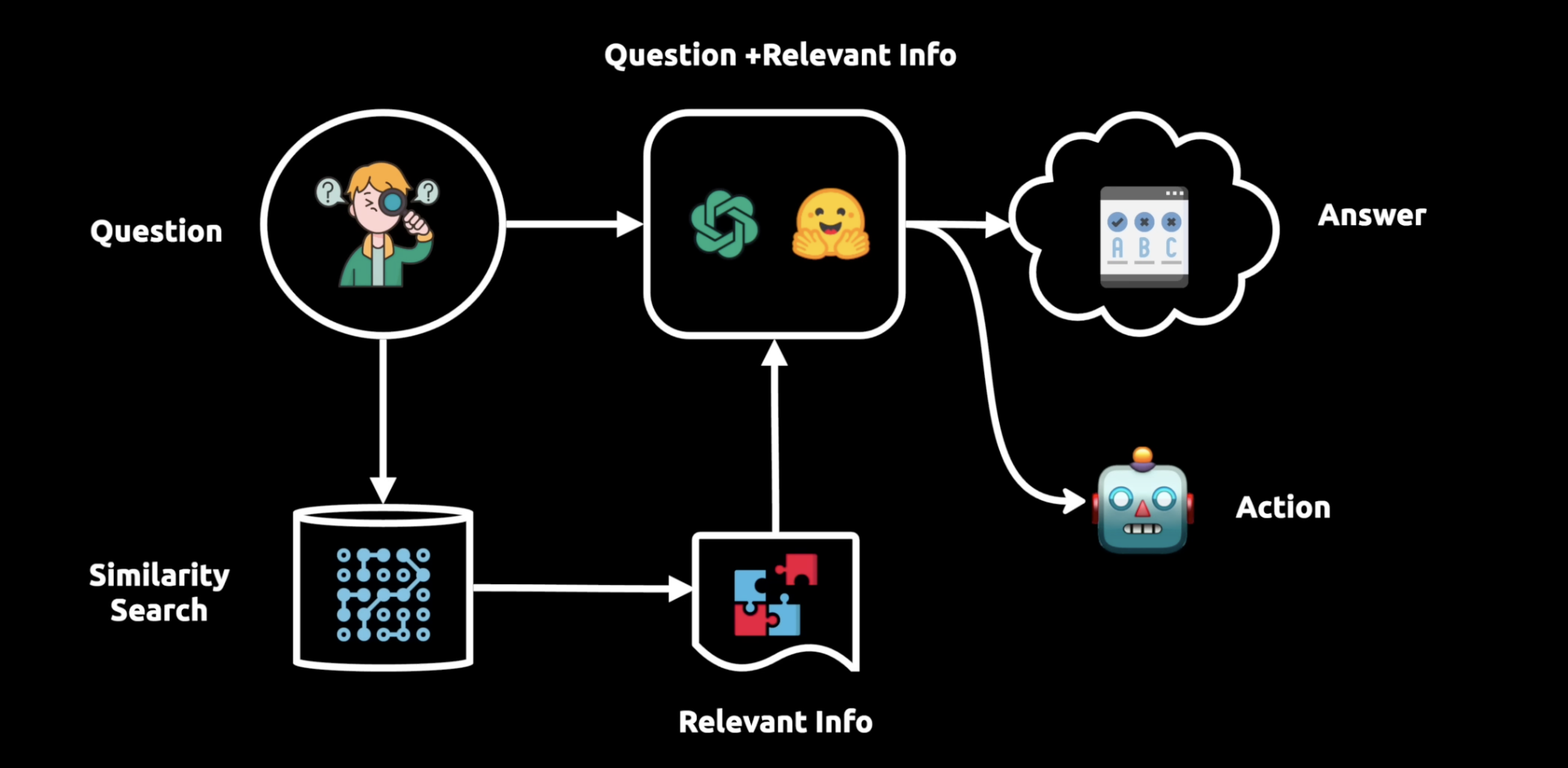
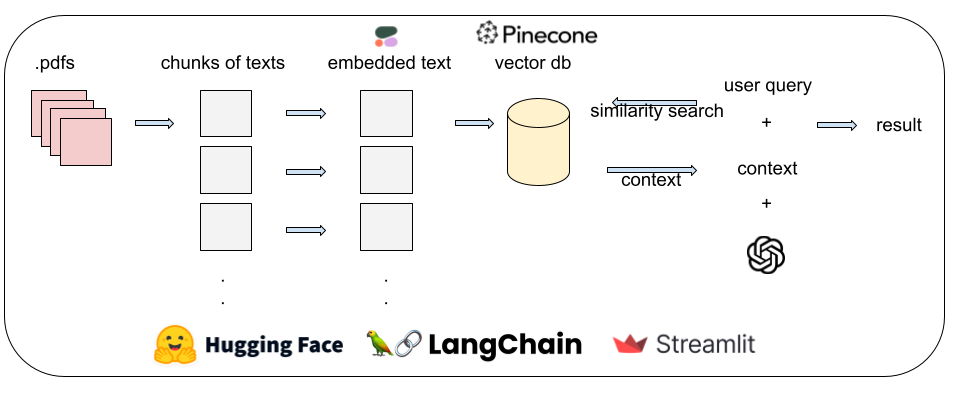
RAG consists of three main stages:
- Ingestion — done offline, before any user question arrives. Data is collected from its source, split into smaller chunks, and embedded into a vector database. This enables
semantic search(retrieval based on meaning, not just keyword overlap). - Retrieval — given a user's query, run a semantic search against the vector database to pull the most relevant chunks.
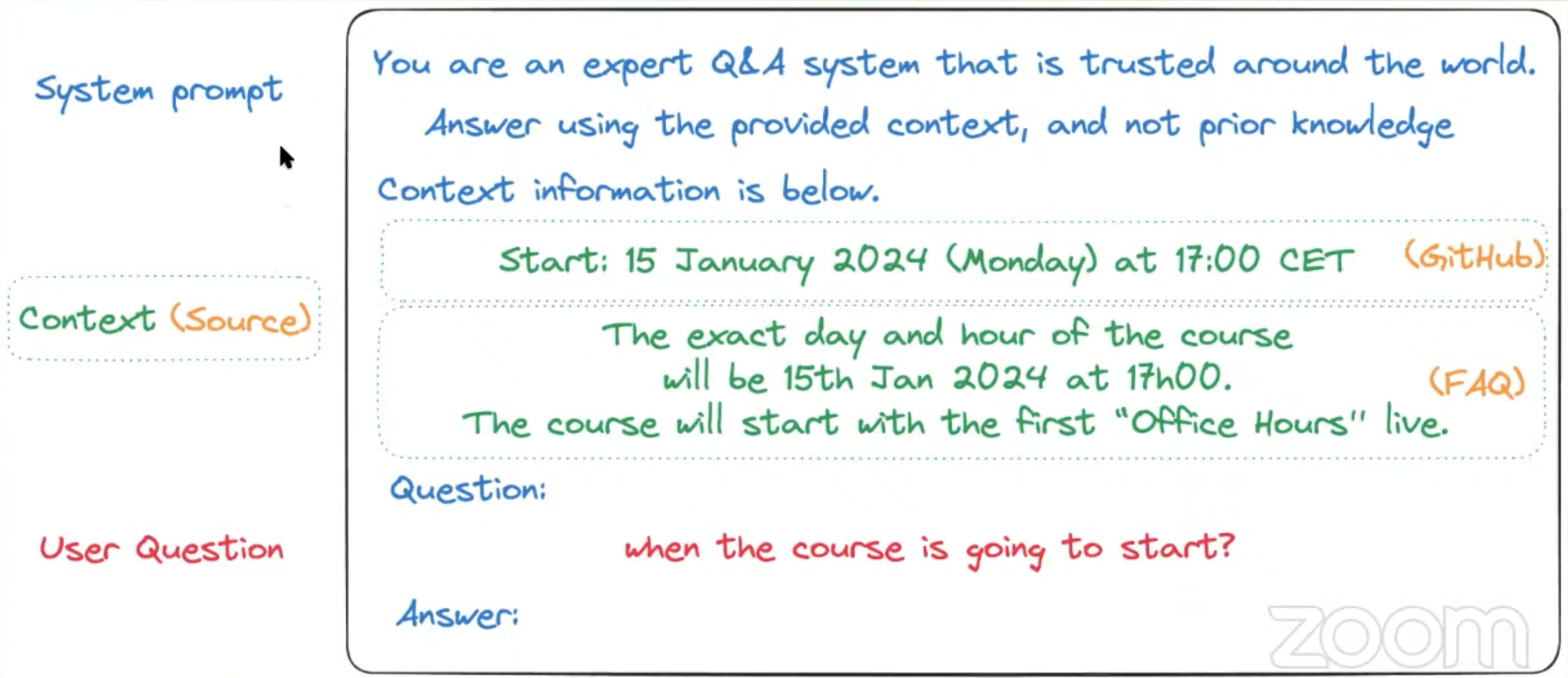
- Generation — construct a final prompt combining the query and retrieved context, and pass it to the LLM to produce an answer.
In short, RAG can be thought of as automated, data-aware prompt engineering.
What is LangChain?
LangChain connects an LLM like GPT-4 to your own data source — anything from a single PDF to an entire database — and provides the plumbing shown in the diagram above: chunking, embedding, retrieval, and chaining it all into a single callable pipeline that can both answer questions and take actions based on those answers.
- It offers modules for model interaction, data connection/retrieval, chains, and agents, covering most of what's needed to build production NLP apps.
- It's used across customer support chatbots, coding assistants, healthcare diagnostics, marketing tools, and more.
- In short, it's a framework that turns the RAG architecture above into a few composable building blocks instead of a pile of custom glue code.
Why a vector database?
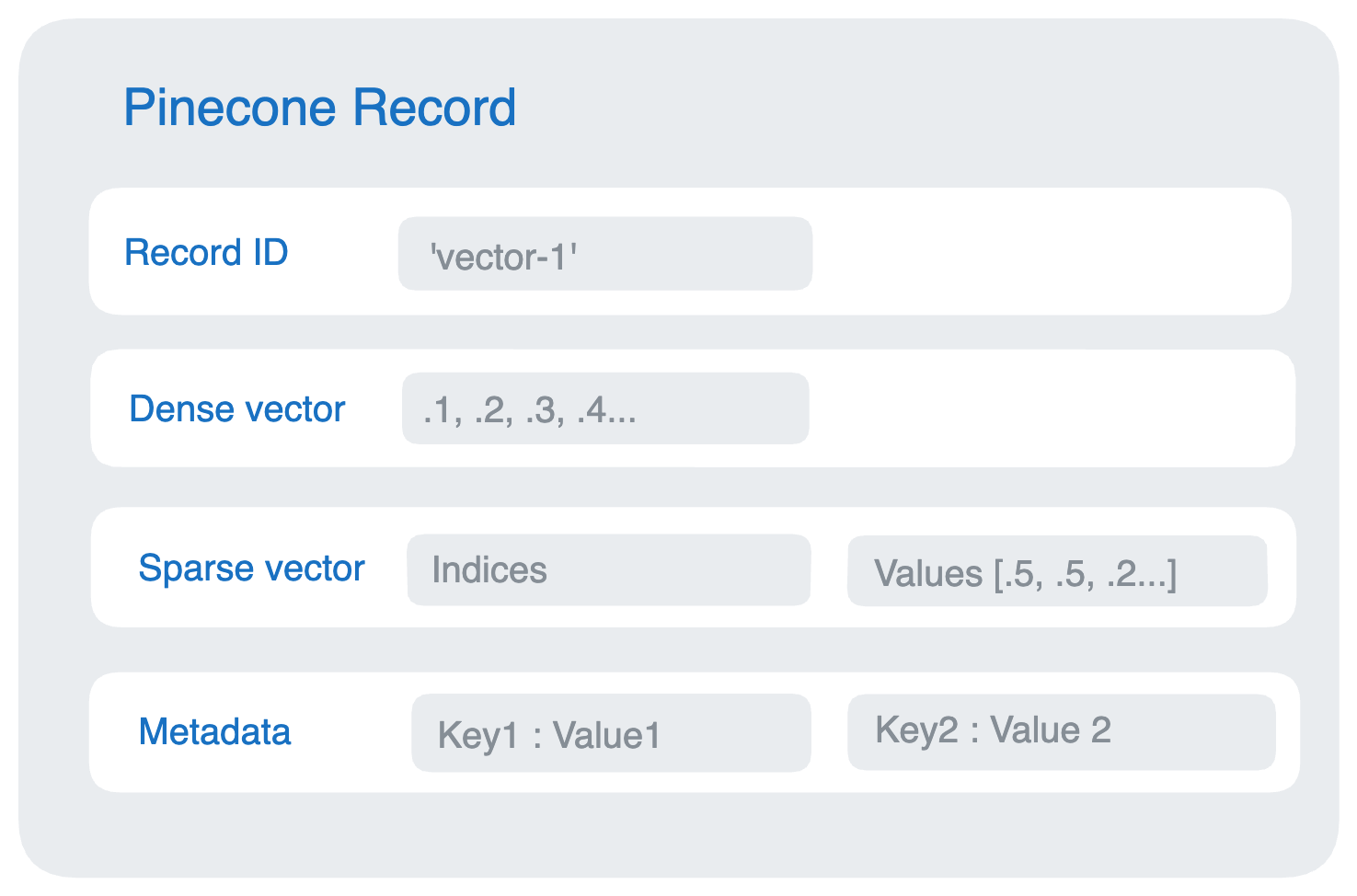
To feed relevant context to the model alongside a query, you need a fast way to find the most relevant chunks of your data. That's the job of a vector database — it converts data into vectors, indexes them, and enables low-latency similarity search over high-dimensional embeddings.
Vector databases matter for RAG because they efficiently store, manage, and index this high-dimensional data, which is what makes retrieval both fast and accurate at scale. Common features include efficient storage, scalability, query optimization, and integration with frameworks like LangChain.
One popular option is Pinecone, which has solid documentation and first-class LangChain integration — it's what I used for the project below.
The project: a RAG helper for course material
With the concepts out of the way, here's how I applied them to something concrete: a RAG-based Q&A app over my own lecture notes and slides for a graduate Applied Machine Learning course (STA5635).
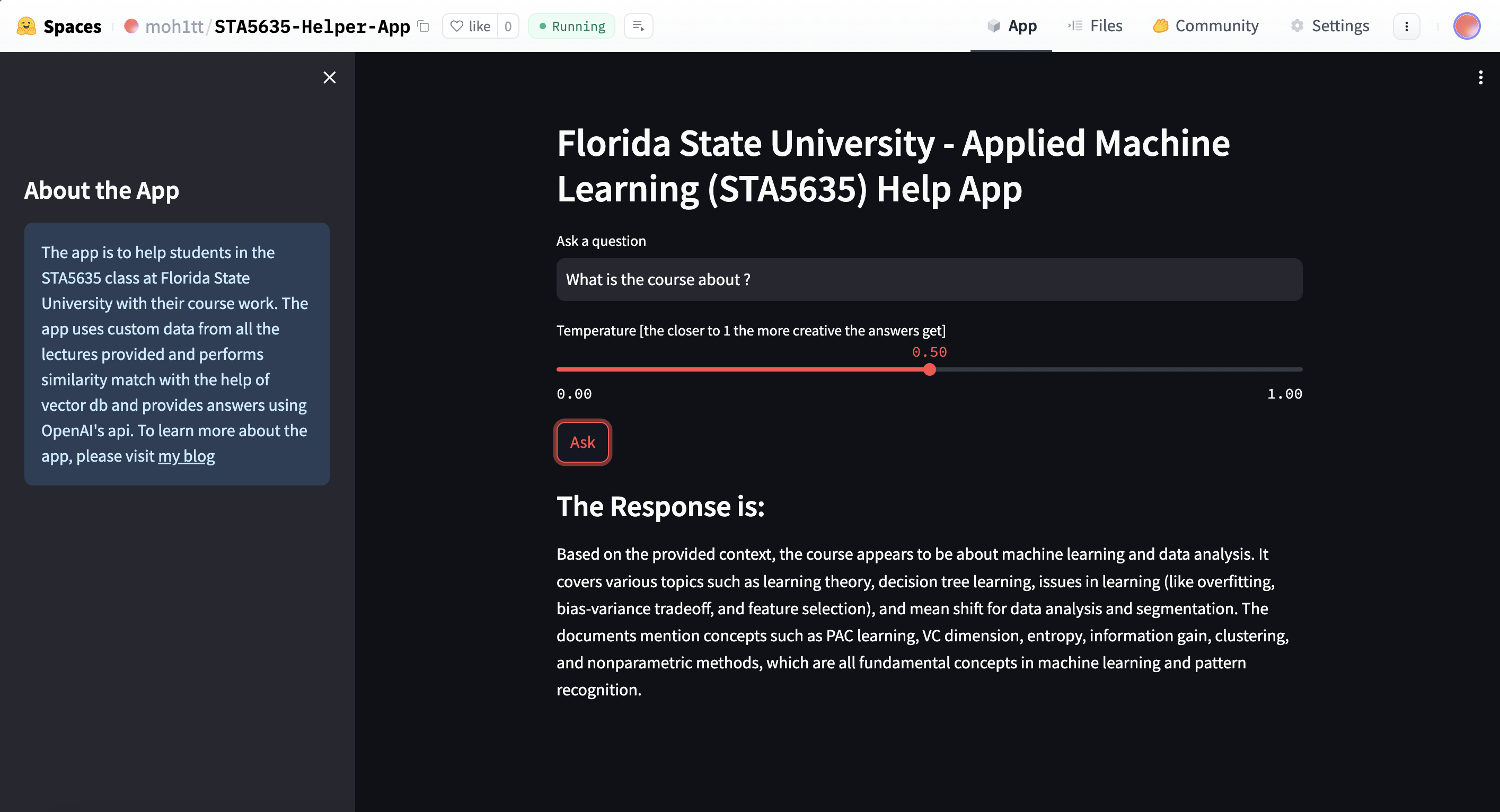
The app queries an LLM with the user's question plus relevant context retrieved from my own course material, combined with a system prompt. You can clone the full project from my GitHub repo.
Setting up the environment
Create a virtual environment:
python3 -m venv venv
source venv/bin/activate
Add a requirements.txt:
langchain
langchain_openai
openai
huggingface_hub
pinecone-client
ipykernel
pypdf
langchain_community
cohere
streamlit
Install everything:
pip install -r requirements.txt
This project uses OpenAI for the LLM, Pinecone for the vector store, and Cohere for embeddings — so you'll need accounts on all three. Store the keys in a .env file (and make sure it's gitignored):
OPENAI_API_KEY=
PINECONE_API_KEY=
PINECONE_INDEX_NAME=
COHERE_API_KEY=
PINECONE_ENVIRONMENT=
Create accounts on OpenAI, Pinecone, and Cohere to get these keys.
Ingesting the source data
My data was a folder of PDFs — lecture notes and slides. The format doesn't matter much; this same pipeline works for CSV, JSON, plain text, or API responses.
I used pypdf to extract text from the PDFs and Cohere to embed it:
# Reading pdfs
def read_pdf(file_path):
    loader = PyPDFLoader(file_path)
    documents = loader.load_and_split()
    return documents


# Process pdfs
def process_documents(documents):
    doc_text = ''
    for doc in documents:
        text = doc.page_content
        text = clean_text(text)
        doc_text += text
    return doc_text


# Preprocess the text
def clean_text(text):
    text = text.replace('\n', ' ')
    text = ''.join(c for c in text if unicodedata.category(c) != 'Co')
    text = re.sub(r'\s+', ' ', text).strip()
    text = re.sub(r'[^a-zA-Z0-9\s]', '', text)
    text = text.lower()
    return text


# Load and process all PDF files in the directory
pdf_dir_path = "pdfs/"

all_texts = []
for filename in os.listdir(pdf_dir_path):
    if filename.endswith(".pdf"):
        file_path = os.path.join(pdf_dir_path, filename)
        documents = read_pdf(file_path)
        texts = process_documents(documents)
        all_texts.append(texts)
That gives us a list of cleaned texts extracted from every PDF in the directory.
Embedding the data
OpenAI's embeddings would work here too, but I used Cohere, following Pinecone's own documentation:
def embed(text):
    embeds = co.embed(
        texts=text,
        model='embed-english-v3.0',
        input_type='search_document',
        truncate='END'
    ).embeddings
    return embeds

embeds = embed(all_texts)
To check embedding dimensions before creating the Pinecone index (the index needs to be created with the matching dimension):
import numpy as np

shape = np.array(embeds).shape
print(shape)
Upserting to Pinecone
Once embeddings are ready, upsert them in batches to avoid timeouts on large uploads:
batch_size = 128

ids = [str(i) for i in range(shape[0])]
meta = [{'text': text} for text in all_texts]
to_upsert = list(zip(ids, embeds, meta))

for i in range(0, shape[0], batch_size):
    i_end = min(i + batch_size, shape[0])
    index.upsert(vectors=to_upsert[i:i_end])

print(index.describe_index_stats())
Full details on upserting are in Pinecone's documentation.
Building the RAG chain
With the vector store populated, the last step is chaining retrieval, prompt construction, and generation:
template = """Answer the question based only on the following context:
{context}
Question: {question}
"""
prompt = ChatPromptTemplate.from_template(template)

model = ChatOpenAI(temperature=0, model="gpt-4-1106-preview")

chain = (
    RunnableParallel({"context": retriever, "question": RunnablePassthrough()})
    | prompt
    | model
    | StrOutputParser()
)
This chains together the retriever (context), prompt (the question), and model (the LLM). Querying it looks like:
chain.invoke("""Are the hidden states of the Hidden Markov Model discrete or continuous?

  Continuous
  Could be either discrete or continuous
  Discrete""")
Deployment
I used Streamlit to turn this into a small web app and hosted it on Hugging Face Spaces. The Streamlit code lives in app.py in the GitHub repo — just remember to gitignore your .env before pushing.
Happy learning! 🚀